Five years ago, I built a special box to let my first child manage the music in her bedroom. As the children grew, I updated the system to make it more robust. Just as I got a 3D printer, I wanted to redesign the case to make it even simpler to build and available for everyone.
Presenting KidJuke!
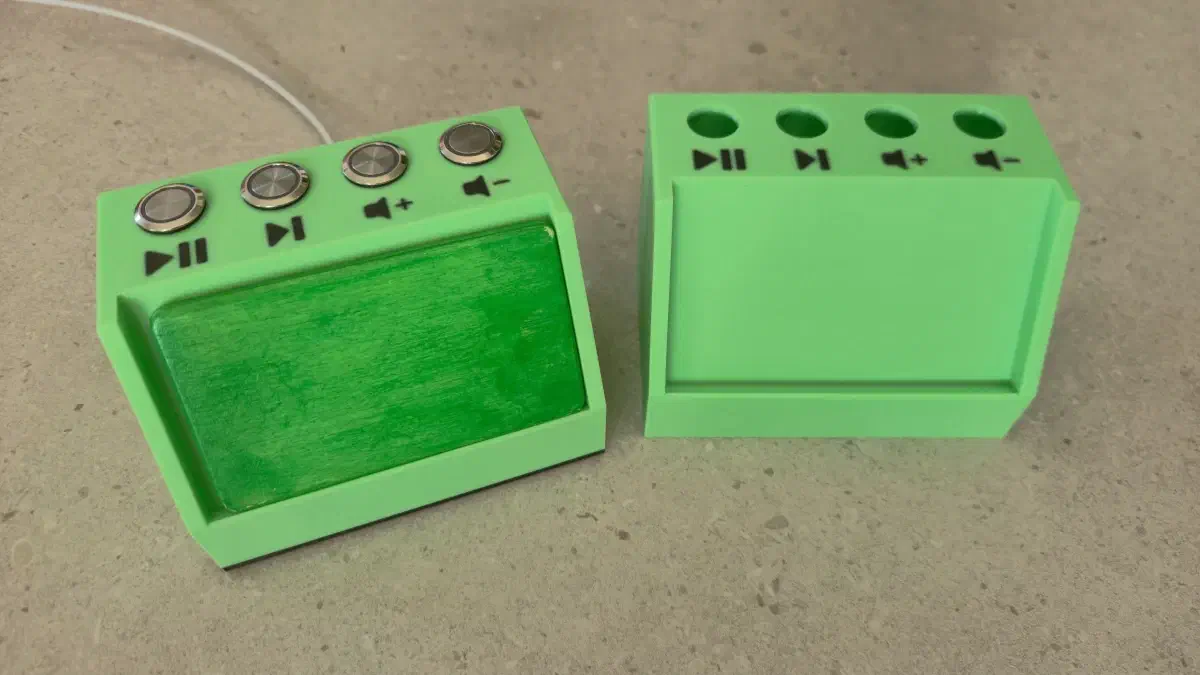
It is a controller that uses RFID cards to choose favorite playlists, albums, or tracks. Thanks to four buttons, children can stop the music, restart it, skip to the next track, and adjust the volume. All of this runs on a powerful ecosystem: Music Assistant, Home Assistant, and ESPHome.
How does it work?#
The idea is simple but effective:
- ESPHome reads the buttons and recognizes when a new RFID card is brought near. The system is smart: it only detects a card change when there is a variation.
- Home Assistant uses a Blueprint to connect the ESPHome controller to automations. A binary helper allows you to lock everything down (useful when children are misbehaving or it’s time to sleep).
- Music Assistant manages playback queues and multimedia files.
With the RFID cards, you can select a specific playlist, album, or track on Music Assistant. Each card can be programmed to add to the queue or replace it completely.
An important detail: when a card is placed on the reader, the music does not start immediately. You must press the “Play” button. This choice avoids nighttime disturbances: if a software update arrives while everyone is asleep, the music won’t turn on by itself in the children’s room! 😴 (No more bass at max volume due to the “HAF” or “WAF” factor!).
Hardware with ESPHome#
For the buttons, I chose simple and economical 16mm momentary switches. Card reading is handled by an RC522 module (via SPI), all connected to an ESP32-C3 Super Mini version.
Pin map#
| ESP32-C3 | RC522 | Buttons |
|---|---|---|
| 1 | Volume Up | |
| 3 | Volume Down | |
| 4 | SCK | |
| 5 | MISO | |
| 6 | MOSI | |
| 7 | SDA | |
| 10 | Play/Pause | |
| 20 | Next Track | |
| 21 | RST |
ESPHome configuration#
Here is the code to configure the device.
# Board: ESP32-C3 Super Mini (Generic)
# Definition: definitions/boards/esp32-c3-supermini/manifest.yaml

esphome:
  name: kidjuke
  friendly_name: KidJuke

esp32:
  variant: esp32c3
  flash_size: 4MB
  framework:
    type: esp-idf

logger:

api:
  encryption:
    key: "REDACTED"

ota:
  - platform: esphome
    encryption:

wifi:
  ssid: !secret wifi_ssid
  password: !secret wifi_password

spi:
  clk_pin: GPIO4
  miso_pin: GPIO5
  mosi_pin: GPIO6

# Global variable to store the last card read
globals:
  - id: last_card_uid
    type: std::string
    restore_value: false
    initial_value: '""'
  - id: ignore_first_tag
    type: bool
    restore_value: false
    initial_value: 'true'

# Text sensor that communicates the card UID to Home Assistant
text_sensor:
  - platform: template
    name: "Last RFID Card"
    id: ultima_carta_rfid

rc522_spi:
  cs_pin:
    number: GPIO7
  reset_pin: GPIO21
  on_tag:
    then:
      - lambda: |-
          std::string current_uid = x;

          // 1. The first card read at device startup is completely ignored
          if (id(ignore_first_tag)) {
            ESP_LOGD("rfid", "First card at startup ignored: %s", current_uid.c_str());
            return;
          }

          // 2. Send the UID to Home Assistant if it is different from the last registered one
          if (current_uid != id(last_card_uid)) {
            id(last_card_uid) = current_uid;
            ESP_LOGD("rfid", "New UID stored and sent to Home Assistant: %s", current_uid.c_str());

            // Send the new UID to the Home Assistant text_sensor
            id(ultima_carta_rfid).publish_state(current_uid);
          } else {
            ESP_LOGD("rfid", "Same card detected, UID already stored: %s", current_uid.c_str());
          }

  on_tag_removed:
    then:
      - lambda: |-
          if (id(ignore_first_tag)) {
            # The very first card at startup was removed: we unlock the system
            id(ignore_first_tag) = false;
            ESP_LOGD("rfid", "First card removed. The reader is now fully active.");
          } else {
            # The card was removed but we keep the UID saved on the sensor and in memory
            ESP_LOGD("rfid", "Card removed. The saved UID remains stored.");
          }

binary_sensor:
  - platform: gpio
    name: Play - Pause
    id: binary_sensor_play_pause
    pin:
      number: GPIO10
      mode:
        input: true
        pullup: true
      inverted: true
    icon: "mdi:play-pause"
    filters:
      - delayed_on: 5ms
  - platform: gpio
    name: Next
    id: binary_sensor_next_song
    pin:
      number: GPIO20
      mode:
        input: true
        pullup: true
      inverted: true
    icon: "mdi:skip-next-outline"
    filters:
      - delayed_on: 5ms
  - platform: gpio
    name: Volume UP
    id: binary_sensor_volume_up
    pin:
      number: GPIO1
      mode:
        input: true
        pullup: true
      inverted: true
    icon: "mdi:volume-plus"
    filters:
      - delayed_on: 5ms
  - platform: gpio
    name: Volume DOWN
    id: binary_sensor_volume_down
    pin:
      number: GPIO3
      mode:
        input: true
        pullup: true
      inverted: true
    icon: "mdi:volume-minus"
    filters:
      - delayed_on: 5ms
The 3D case#
I designed the case to keep the selected card always visible: so children can personalize their own RFID cards! The buttons are on top: when pressed, the force pushes downwards, preventing the box from sliding around the room. The USB-C port is on the back to power the ESP32-C3.
The box is divided into two parts (lid and base) closed by screws that hold the ESP32 in place. On the base, I added silicone strips to prevent slipping. I also created an adapter to make “credit card” format RFID cards less fragile.
The print files are available on Printables.
| Screw | Length | Quantity |
|---|---|---|
| M3 | 16mm | 4 |
| M2.5 | 5mm | 1 |
The Home Assistant Blueprint#
The heart of the system is the Blueprint. It makes configuration simple and fast, hiding the complexity of the automation. This blueprint was born for KidJuke but can manage other devices, provided you have Music Assistant installed.
You can find it here: Post on Blueprint Exchange.
Configuration parameters#
Here is what you can customize:
| Field | Values | Observations |
|---|---|---|
| Music Player | MA Entity | Choose the media_player of Music Assistant to control. |
| Lock Switch | input_boolean Entity | Mandatory. Create a helper to block commands (e.g., “time to sleep”). |
| RFID Sensor | Text Entity | Receives the card ID or the text to associate with the music. |
| Play/Pause Button | Entity | Must send an ON signal when pressed. ESPHome already has an anti-bounce filter. |
| Next Song Button | Entity | |
| Volume UP Button | Entity | |
| Volume DOWN Button | Entity | |
| Minimum Volume | 0.0 - 1.0 | Minimum volume (0 = 0%, 1 = 100%). |
| Maximum Volume | 0.0 - 1.0 | Maximum volume allowed by buttons. |
| Volume Step | 0.01 - 0.2 | How much the volume changes with each click. |
| Command Delay | 0 - 3 sec | Wait time after a command before accepting another. |
| Default Media Type | playlist, album, track, artist, radio | Search type if not specified on the card. |
| Default Queue Action | play, next, add, replace | Whether the music replaces the queue or is added. |
| Shuffle Default | true, false | Default random playback. |
| RFID Card Mapping | ID:query:type:queue:shuffle | Two possible formats: short (uses default) or advanced (specify everything for each card). Each line starts with “-”. |
The Blueprint code#

blueprint:
  name: "KidJuke Controller (Music Assistant)"
  description: "Manages the complete KidJuke controller with buttons, RFID and Music Assistant integration."
  domain: automation
  input:
    media_player:
      name: Music Player (Music Assistant)
      description: The media_player managed by Music Assistant on which to play the music.
      selector:
        entity:
          domain: media_player
    enabled_switch:
      name: Lock Switch / Disable
      description: Switch (e.g., input_boolean) to block commands when ON (e.g., child lock).
      selector:
        entity:
          domain: input_boolean
    rfid_sensor:
      name: ESPHome RFID Sensor
      description: The ESPHome text sensor that receives the RFID card ID (keeps the last read).
      selector:
        entity:
          domain: sensor
    btn_play_pause:
      name: Play/Pause Button
      description: Entity that detects the Play/Pause button press.
      selector:
        entity:
          domain: [binary_sensor]
    btn_next:
      name: Next Song Button
      description: Entity that detects the button press for the next track.
      selector:
        entity:
          domain: [binary_sensor]
    btn_volume_up:
      name: Volume Up Button
      description: Entity that detects the button press to increase volume.
      selector:
        entity:
          domain: [binary_sensor]
    btn_volume_down:
      name: Volume Down Button
      description: Entity that detects the button press to decrease volume.
      selector:
        entity:
          domain: [binary_sensor]
    min_volume:
      name: Minimum Volume
      description: Minimum volume applied when starting playback via RFID card (from 0.0 to 1.0).
      default: 0.1
      selector:
        number:
          min: 0.0
          max: 1.0
          step: 0.05
          mode: slider
    max_volume:
      name: Maximum Volume
      description: Maximum volume allowed for the player via buttons (from 0.0 to 1.0).
      default: 0.7
      selector:
        number:
          min: 0.0
          max: 1.0
          step: 0.05
          mode: slider
    volume_step:
      name: Volume Variation Step
      description: How much the volume varies with each button press (from 0.01 to 0.2).
      default: 0.05
      selector:
        number:
          min: 0.01
          max: 0.2
          step: 0.01
          mode: slider
    command_delay:
      name: Delay after button commands
      description: Wait time (in seconds) after executing a button (excluding volume down).
      default: 0.3
      selector:
        number:
          min: 0.0
          max: 3.0
          step: 0.1
          mode: slider
    default_media_type:
      name: Default Media Type
      description: Fallback value if not specified on the card (e.g., playlist, album, track, artist).
      default: playlist
      selector:
        select:
          options:
            - playlist
            - album
            - track
            - artist
            - radio
    default_enqueue:
      name: Default Queue Action (Enqueue)
      description: Replacement (play) or queuing (add/next) if not specified on the card.
      default: play
      selector:
        select:
          options:
            - play
            - next
            - add
            - replace
    default_shuffle:
      name: Default Random Playback (Shuffle)
      description: Activate or deactivate random playback by default if not specified on the card.
      default: false
      selector:
        boolean:
    card_mappings:
      name: RFID Card Mapping (Advanced Format)
      description: >
        String format: card_ID:search_text:media_type:queue_replacement:random_playback
        (The last three fields are optional).
      selector:
        object:
      default:
        - "12-34-56-78:90s Hits:playlist:play:false"
        - "87654321:Bedtime Stories:album"

mode: queued

trigger:
  - platform: state
    entity_id: !input btn_play_pause
    id: btn_play_pause
    to: "on"
  - platform: state
    entity_id: !input btn_next
    id: btn_next
    to: "on"
  - platform: state
    entity_id: !input btn_volume_up
    id: btn_volume_up
    to: "on"
  - platform: state
    entity_id: !input btn_volume_down
    id: btn_volume_down
    to: "on"

action:
  # CHILD LOCK CONTROL: if the switch is ON, the condition fails and execution stops
  - condition: state
    entity_id: !input enabled_switch
    state: "off"

  - variables:
      media_player_entity: !input media_player
      rfid_sensor_entity: !input rfid_sensor
      min_vol: !input min_volume
      max_vol: !input max_volume
      step_val: !input volume_step
      cmd_delay: !input command_delay
      def_media_type: !input default_media_type
      def_enqueue: !input default_enqueue
      def_shuffle: !input default_shuffle
      raw_mappings: !input card_mappings
      parsed_mappings: >
        {% set valid_types = ['playlist', 'album', 'track', 'artist', 'radio'] %}
        {% set ns = namespace(result=[]) %}
        {% for item in raw_mappings %}
          {% set parts = item.split(':') %}
          {% if parts | length >= 2 %}
            {% set rfid = parts[0] | trim %}
            {% set query = parts[1] | trim %}

            {% set p2 = parts[2] | trim if parts | length > 2 else '' %}
            {% set p3 = parts[3] | trim if parts | length > 3 else '' %}
            {% set p4 = parts[4] | trim if parts | length > 4 else '' %}

            {% if p2 in valid_types %}
              {% set m_type = p2 %}
              {% set enq = p3 if p3 != '' else def_enqueue %}
              {% set shuf = (p4 | lower == 'true') if p4 != '' else def_shuffle %}
            {% elif p2 != '' and p2 not in valid_types %}
              {% set m_type = def_media_type %}
              {% set enq = p2 %}
              {% set shuf = (p3 | lower == 'true') if p3 != '' else def_shuffle %}
            {% else %}
              {% set m_type = def_media_type %}
              {% set enq = def_enqueue %}
              {% set shuf = def_shuffle %}
            {% endif %}

            {% set ns.result = ns.result + [{
              'rfid': rfid,
              'query': query,
              'media_type': m_type,
              'enqueue': enq,
              'shuffle': shuf
            }] %}
          {% endif %}
        {% endfor %}
        {{ ns.result }}

  - choose:
      # 1. PLAY / PAUSE MANAGEMENT (with delay applied)
      - conditions:
          - condition: trigger
            id: btn_play_pause
        sequence:
          - variables:
              player_state: "{{ states[media_player_entity].state }}"
              last_card: "{{ states[rfid_sensor_entity].state if rfid_sensor_entity != '' else '' }}"
              matched_last_item: "{{ parsed_mappings | selectattr('rfid', 'eq', last_card) | first | default(none) }}"

          - choose:
              # If music is playing, pause it
              - conditions:
                  - "{{ player_state == 'playing' }}"
                sequence:
                  - service: media_player.media_play_pause
                    target:
                      entity_id: "{{ media_player_entity }}"
              # If music is NOT playing and a valid card is stored, start playback of the card
              - conditions:
                  - "{{ last_card not in ['', 'unknown', 'unavailable'] }}"
                  - "{{ matched_last_item is not none and matched_last_item.query is defined }}"
                sequence:
                  - service: media_player.volume_set
                    target:
                      entity_id: "{{ media_player_entity }}"
                    data:
                      volume_level: "{{ min_vol }}"
                  - service: media_player.shuffle_set
                    target:
                      entity_id: "{{ media_player_entity }}"
                    data:
                      shuffle: "{{ matched_last_item.shuffle }}"
                  - service: music_assistant.play_media
                    target:
                      entity_id: "{{ media_player_entity }}"
                    data:
                      media_id: "{{ matched_last_item.query }}"
                      media_type: "{{ matched_last_item.media_type }}"
                      enqueue: "{{ matched_last_item.enqueue }}"
            default:
              # Standard play/pause fallback if not playing and no valid cards stored
              - service: media_player.media_play_pause
                target:
                  entity_id: "{{ media_player_entity }}"
          - delay: "{{ cmd_delay }}"

      # 2. NEXT SONG MANAGEMENT (with delay applied)
      - conditions:
          - condition: trigger
            id: btn_next
        sequence:
          - service: media_player.media_next_track
            target:
              entity_id: "{{ media_player_entity }}"
          - delay: "{{ cmd_delay }}"

      # 3. VOLUME UP MANAGEMENT (with delay applied)
      - conditions:
          - condition: trigger
            id: btn_volume_up
        sequence:
          - variables:
              current_vol: "{{ state_attr(media_player_entity, 'volume_level') | float(0) }}"
              new_vol: "{{ [current_vol + step_val, max_vol] | min }}"
          - service: media_player.volume_set
            target:
              entity_id: "{{ media_player_entity }}"
            data:
              volume_level: "{{ new_vol }}"
          - delay: "{{ cmd_delay }}"

      # 4. VOLUME DOWN MANAGEMENT (WITHOUT any delay, completely instantaneous)
      - conditions:
          - condition: trigger
            id: btn_volume_down
        sequence:
          - variables:
              current_vol: "{{ state_attr(media_player_entity, 'volume_level') | float(0) }}"
              new_vol: "{{ [current_vol - step_val, min_vol] | max }}"
          - service: media_player.volume_set
            target:
              entity_id: "{{ media_player_entity }}"
            data:
              volume_level: "{{ new_vol }}"
I hope this project is useful for creating a bit of music in your little ones’ lives!